Grout
New in GroutApp and GroutCode

The right AI model, for every request.

A one-line fix and a twenty-page report should not cost the same. Model routing reads each request and runs the cheapest model that can do it well. Choose JEV, which routes on Grout Cloud with nothing to set up, or Laya, an open decision model that routes right here on your computer. Your selected model still runs whenever routing is unsure.

JEV on Grout Cloud, Laya on your computer
2 routersJEV on Grout Cloud, Laya on your computer
for Laya to decide on a recent laptop
≈0.2 sfor Laya to decide on a recent laptop
to decide with Laya; you pay only for the answer
0 Meritsto decide with Laya; you pay only for the answer
in GroutApp, plus the agent, Ask, Team and bots in GroutCode
8 placesin GroutApp, plus the agent, Ask, Team and bots in GroutCode

Two routers, one switch

Turn on one of them; turning one on turns the other off. Both live under Settings → Model routing.

JEVGrout Cloud or your own JEV key

On Grout Cloud, JEV sits inside the AI service. It reads the conversation, picks the cheapest model that clears the bar and bills you in Merits for the model it picked. Nothing to install and no key. Steer it toward saving Merits or toward quality, and list models to prefer or never use. With your own JEV key, the decision is made from your computer and the request runs on the model it names.

  • No setup on Grout Cloud
  • Leaning: Let JEV decide, Save Merits, Balanced, Best quality
  • Prefer and never-use lists
LAYAOn this computer

Laya is an open decision model that runs on your own computer. Download it once (about 1.7 GB, every piece checked before use) and it reads only your message, answers one question, how hard is this, and turns the answer into a light, balanced or strong model. Nothing is sent anywhere to decide, and deciding costs no Merits and needs no key.

  • Runs offline, about a fifth of a second
  • Leaning: Save Merits, Balanced, Best quality
  • Works on Grout Cloud and on your own provider key

What model routing does

The rules every routed request follows, whichever router picks.

Light, balanced or strong

A greeting stays on a light model, an email lands in the middle, a proof or a database design goes to a strong one. The ladder is built from the models you can actually use, cheapest first.

Never moves you down when unsure

If the router is not confident, it will not switch you to a cheaper model. At most it moves you one step up.

Long conversations keep their model

Switching models re-sends the whole conversation. Once a chat is long, a cheaper model is no longer worth it, so it stays where it is.

Your pick stands

Choose a model by hand for a message and that choice runs, untouched. Routing only decides when you let it.

Fails open, never blocks

If routing fails, is slow, or the service turns the routed request down, your selected model runs. Nothing ever waits on the router.

Your own key, your bill

On your own provider key, Laya and JEV with a JEV key choose among that provider's current models and never pick one that costs more than the one you selected.

Switch it on per feature

AI chat, the AI creator, documents, presentations, Alpha Learning, the 3D and circuit assistants, practicals and grading each have their own switch. In GroutCode: the agent, Ask, Team and bots.

Every decision on record

Routing results shows what each request was routed to, why, and what it cost against the model you had selected, split by router.

Inside the app

Real screens from GroutApp and GroutCode, not mockups.

GroutApp Model routing settings with the Laya section open: Use Laya switched on, the Laya English model loaded, leaning set to Balanced, and a speed test button

Laya, on this computer

Turn Laya on, download the model once, choose a leaning and test the speed on your own machine.

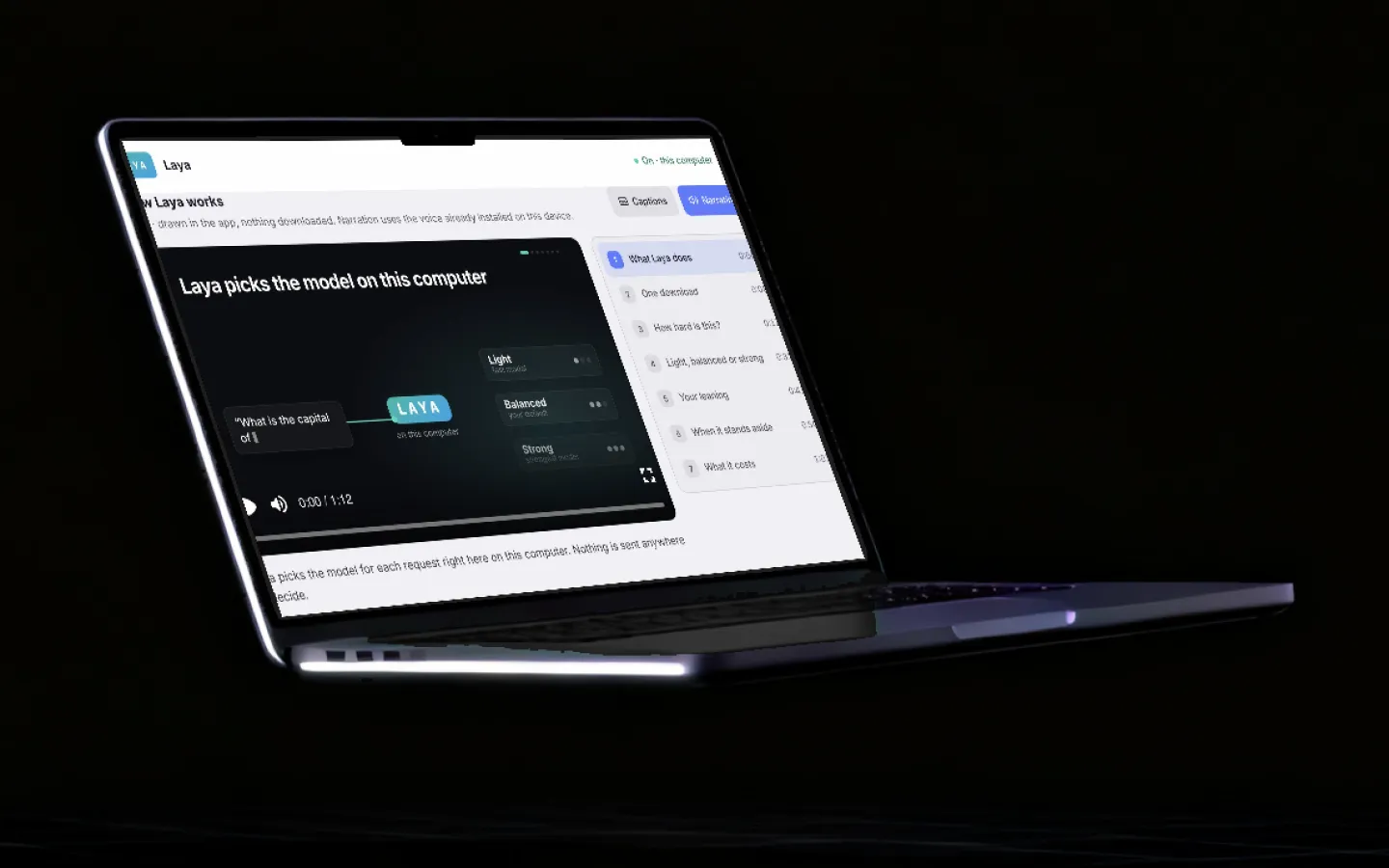
The How Laya works explainer video inside GroutApp, showing a request flowing through Laya to a light, balanced or strong model, with chapters listed on the right

How Laya works, in the app

A narrated one-minute explainer sits next to each router's settings, drawn in the app and voiced in advance.

GroutCode Model routing settings in dark mode, with the JEV section showing mode, leaning, preferred models and the TypeSafe key field, and the Laya section switched on

JEV and Laya in GroutCode

The same two routers in GroutCode, under Settings → Model routing, with a JEV or LAYA chip beside the composer's model picker.

Turn it on in four steps

The same in GroutApp and GroutCode.

  1. 1

    Open Model routing

    In GroutApp, open AI settings and choose Model routing. In GroutCode, open Settings → Model routing.

  2. 2

    Choose a router

    Pick JEV on Grout Cloud for no setup, JEV with your own JEV key, or Laya on this computer.

  3. 3

    Set a leaning

    Save Merits keeps more requests on light models; Best quality sends more of them to strong ones.

  4. 4

    Use any AI feature

    Keep working as usual. A JEV or LAYA chip shows where routing is on, and Routing results shows every decision.

JEV or Laya?

Both follow the same rules. The difference is where the decision is made and what it needs.

  • Where it decides

    JEV on Grout Cloud
    Inside the AI service
    JEV with your key
    From your computer, with your JEV key
    Laya
    On your computer
  • What you need

    JEV on Grout Cloud
    Nothing
    JEV with your key
    A JEV key
    Laya
    A one-time 1.7 GB download
  • Cost of deciding

    JEV on Grout Cloud
    Billed at the model it picks, in Merits
    JEV with your key
    Your JEV key's plan
    Laya
    None
  • Works on your own provider key

    JEV on Grout Cloud
    No
    JEV with your key
    Yes
    Laya
    Yes
  • Languages

    JEV on Grout Cloud
    Any
    JEV with your key
    Any
    Laya
    Best in English; other scripts keep your model

Why route models at all

Most people pick one AI model and send everything to it. If that model is strong, every "thanks", every quick lookup and every one-line rewrite is billed at the strong model's price. If it is cheap, the hard questions get weak answers. Students and schools on a budget feel both.

Model routing makes that choice per request. A short factual question goes to a light model that answers it just as well; a proof, a long report or a tricky bug goes to a strong one. Over a term, that is the difference between Merits running out in March and lasting until June.

Safe by default

Routing should never make an answer worse. That is why both routers sit behind the same rules: no downgrade when unsure, no switch in a long conversation, your hand-picked model always stands, and your selected model runs whenever the router is slow or unavailable. Local AI, voice and image generation are never routed.

Frequently asked questions

What is model routing?

Model routing chooses which AI model answers each request. Instead of sending everything to the model you selected, a router reads the request and runs the cheapest model that can do it well: a light model for easy requests, a strong one for hard ones.

What is the difference between JEV and Laya?

JEV routes on Grout Cloud, inside the AI service, with nothing to set up, or from your computer with your own JEV key. Laya is an open decision model that runs on your own computer after a one-time download; nothing is sent anywhere to decide and deciding costs no Merits. Only one runs at a time.

Does routing cost extra Merits?

No. On Grout Cloud you pay in Merits for the model JEV picks, exactly as if you had picked it. Laya's decision is free. The point of routing is to spend fewer Merits on requests a cheaper model handles just as well.

Will routing make my answers worse?

It is built not to. A router that is unsure never moves you to a cheaper model, a long conversation keeps its model, a model you pick by hand for a message always stands, and if routing fails or is slow your selected model runs.

Does it work with my own OpenAI, Anthropic or Google key?

Yes, with Laya or with JEV on your own JEV key. They choose among your provider's current models and never pick one that costs more than the model you selected. JEV on Grout Cloud is the service's own router and does not run on someone else's key.

Does Laya work offline and in other languages?

Laya decides on your computer with no internet needed for the decision itself. The current model is the English one: for a message mostly in another script, or while Laya is still loading, your selected model simply runs.

Which features are routed?

In GroutApp: AI chat, the AI creator, documents, presentations, Alpha Learning, the 3D and circuit assistants, practicals and grading, each with its own switch. In GroutCode: the agent (with Plan and Debug), Ask, Team and bots. Local AI, voice and image generation are never routed.

Can I see what routing did?

Yes. Routing results lists recent decisions with the router, the model you selected, the model that ran, the reason in plain words and what it cost against your selected model.

Stop paying strong-model prices for easy questions.

Download GroutApp or GroutCode for Windows or Mac, open Settings → Model routing and turn on JEV or Laya.

Download GroutApp