

An AI teacher for students,
even when the Wi-Fi drops.
GroutApp gives students two kinds of AI teacher. On-device voice tutors run entirely on the student's own computer: speech recognition, the tutor model and the voice, with the network off and no audio leaving the room. And when there is a connection, the live AI Teacher in Alpha Learning teaches at a whiteboard. Here is exactly what works where.
Updated
- AI models that run on your own machine
- 200+AI models that run on your own machine
- audio streamed by the offline voice tutor
- 0audio streamed by the offline voice tutor
- needed once signed in, for local models
- No Wi-Fineeded once signed in, for local models
- on students' own laptops and lab PCs
- Win · Macon students' own laptops and lab PCs
The live teacher, for when you are online
The offline tutors and the live AI Teacher live in the same app. This is the online one at work.
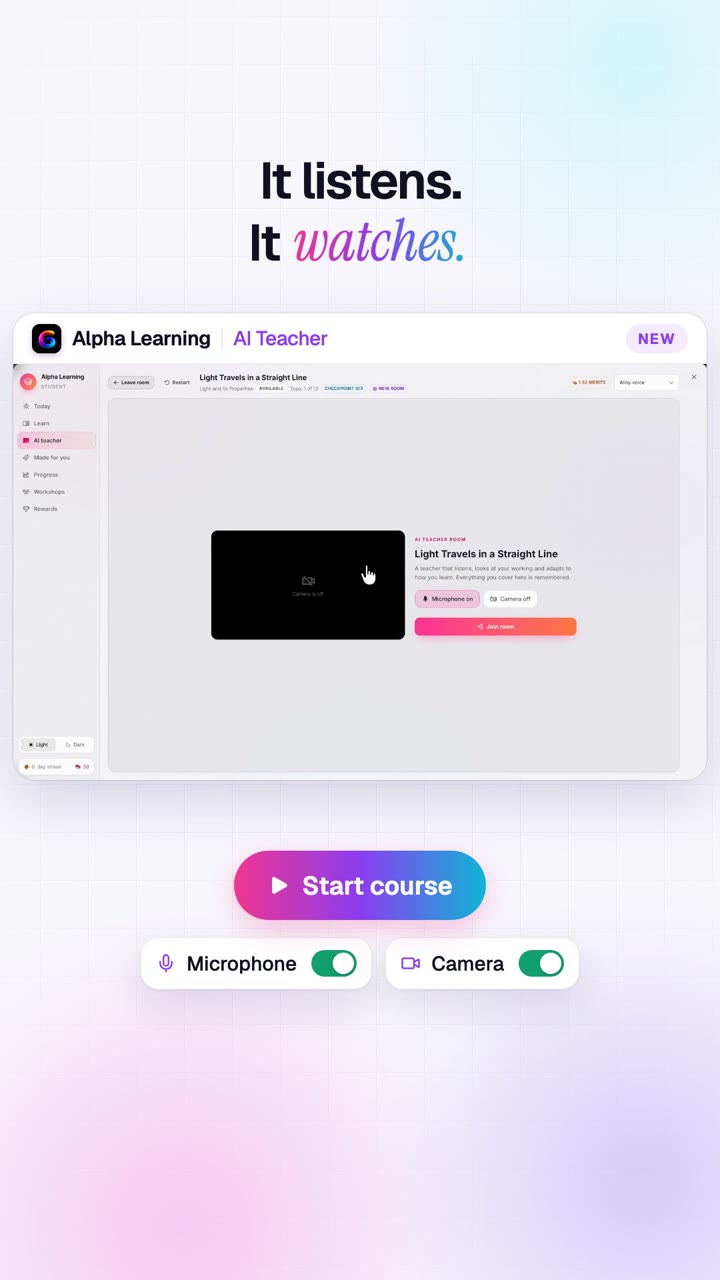
The live AI Teacher (needs a connection)
Recorded in GroutApp: a whiteboard lesson on light with a checkpoint quiz. Use it when you are online; switch to the offline tutors when you are not.
What your offline AI teacher can do
Everything on this list runs on the student's computer, with the network disconnected.
A voice tutor with no internet
Speech-to-text, turn detection, the tutor model and text-to-speech all run on-device. Ask out loud, hear the explanation, keep going, all with the Wi-Fi off.
Tutors you set up per subject
Build a physics tutor that works through derivations, a language partner that corrects you, or a revision coach. Each has its own instructions and model.
Answers from your own textbook
AI Memory indexes your textbooks, notes and syllabus locally, so the offline tutor answers from the book you are studying, with page references.
Reads your handwriting
Vision models on the machine read a photo of handwritten notes or a worked problem, so you can ask about what you wrote without uploading it.
Explains rather than answers
Tutors are set up to work a problem through with you, step by step, which is better for learning and is the kind of AI use most school policies allow.
No meter running
Local models have no per-minute or per-prompt cost. A student can talk to an offline tutor for an hour on a train or in a village with no signal.
Works on filtered networks
School networks that block AI websites do not block a model running on the laptop. Nothing to whitelist, nothing to proxy.
Student work stays on the device
With local models, prompts, notes and audio are processed on the student's own computer and are not uploaded.
Lessons built before you go offline
Curricula and animated lessons are prepared in Alpha Learning, with local models available for much of the writing.
Build the course while online
Generate a concept graph from a board, grade and subject, a pasted syllabus or your own textbooks in AI Memory, then review and publish.

Animated lessons on the machine
Choose a local writing model for topic animations; the voiceover is recorded on the computer itself.

What works offline, and what needs a connection
Honest, feature by feature. A Grout account and one sign-in are required either way.
| Feature | Offline | Needs internet |
|---|---|---|
| Voice tutor (speak and listen) | Yes: speech recognition, tutor model and voice run on-device | No |
| Chat with a local AI model | Yes: 200+ local models | No |
| Ask your own textbook (AI Memory) | Yes: indexed on your machine | No |
| Read handwritten notes | Yes: local vision models | No |
| Live AI Teacher at the whiteboard | No | Yes: runs on Google Gemini Live |
| Generating a new Alpha curriculum | No | Yes: curricula are generated in the cloud |
| Nexus AI cloud models (300+) | No | Yes: uses Merits |
Why an offline AI teacher matters
Most AI tutors are websites. They stop the moment the connection does, they are blocked on many school networks, and every question a student asks becomes a request to someone else's server. For a student in a hostel with patchy Wi-Fi, on a long commute, or in a school that filters AI sites, that means no tutor at all at exactly the moment they sit down to study.
GroutApp runs its models on the student's own laptop instead. Once signed in, the voice tutor, local chat models, textbook search and handwriting reading keep working with the network unplugged. Nothing is streamed, nothing is metered, and there is no audio feed from a child's desk leaving the house.
And when you are online
The live AI Teacher in Alpha Learning is the one part that needs a connection, because it holds a real-time conversation on Google's Gemini Live model while it draws on the whiteboard. It is worth it for a full lesson with a checkpoint quiz. The practical pattern most students settle into: live lessons when the connection is good, offline voice tutors and textbook questions for revision anywhere else.
Both run inside the same app on Windows or macOS, so switching costs nothing but a click.

Set up your offline AI tutor
- 1
Install GroutApp
Download for Windows or macOS and sign in once with your Grout account.
- 2
Download a local model
Pick a model sized for your computer from the on-device model library.
- 3
Add your textbooks
Drop your books and notes into AI Memory so the tutor answers from them.
- 4
Turn on voice mode
Choose a tutor and a voice, unplug the Wi-Fi if you like, and start talking.
Frequently asked questions
Is there an AI teacher that works offline?
Yes. GroutApp's voice tutors run speech recognition, a local language model and text-to-speech on the student's own computer, so a spoken tutoring session works with the internet disconnected. The live whiteboard AI Teacher in Alpha Learning is the exception: it needs a connection.
Does the live AI Teacher work without internet?
No. The live AI Teacher runs on Google's Gemini Live model so it can talk, listen and draw in real time, and that needs an internet connection. Use the offline voice tutors for study without Wi-Fi.
Do I need an account to use the offline tutor?
Yes. A Grout account is required to use GroutApp. After signing in, local models run without a connection.
What computer do I need for offline AI?
GroutApp runs on Windows and macOS. Smaller local models run on ordinary student laptops; larger ones need more memory. The model library shows which models suit your machine. There is no Linux build.
Can the offline tutor teach from my textbook?
Yes. Add your textbooks, notes and syllabus to AI Memory. They are indexed on your computer, and the tutor answers from them with page references, offline.
Is my voice recorded or uploaded?
Not with the offline voice tutor: audio is transcribed on the machine it was captured on and is not transmitted. During a live AI Teacher lesson, the conversation is processed by Google Gemini through Grout's relay or your own Google key.
Does offline AI cost extra?
Local models have no per-prompt or per-minute charge. The live AI Teacher uses lesson time, with 30 free minutes on every account, or your own Google Gemini key.
A tutor that keeps working when the signal does not.
Download GroutApp for Windows or Mac. Offline voice tutors and local models, plus the live AI Teacher when you are online.
Download GroutApp